


Contractor Estimate & Invoice
4.6326.00 Reviews
App Specs
- Version
- 1.827
- Updated On
- License
- Free
- Downloads
- 100,000+
- Developer
- GetCost
- Categories
- Business
- Platform
- Android
Screenshots
 Analysis by AppCompare
When several people share a phone or tablet at home, a contractor’s paperwork can easily become mixed up with family reminders, shopping lists, and personal messages. I see the appeal of keeping estimates, invoices, payment tracking, timesheets, and scheduling together in a work-focused app, especially when a small crew is trying to stay coordinated between jobs. The important question is whether that convenience fits the way you handle client and business information.
A shared device needs clear boundaries
Contractor Estimate & Invoice is a free business app from GetCost, but free to install does not mean every use is necessarily without cost: in-app purchases are available, ranging from $9.99 to $599.99 per item. I’d check the purchase choices before making it part of a household routine, particularly if other people can use the device. That is a practical precaution, not a reason to avoid the app; it simply helps keep business spending deliberate.
I would treat the account and its records as belonging to the contractor, rather than as a shared family workspace. Estimates, invoices, client details, and payment information are work records, so a shared device should be handed over thoughtfully. If several people need to use the app, agree in advance who is responsible for entering or changing business information. That small boundary can prevent an accidental edit from becoming a confusing conversation with a client.
Coordination is useful when responsibilities are clear
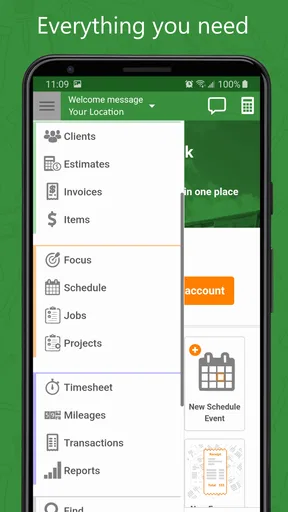
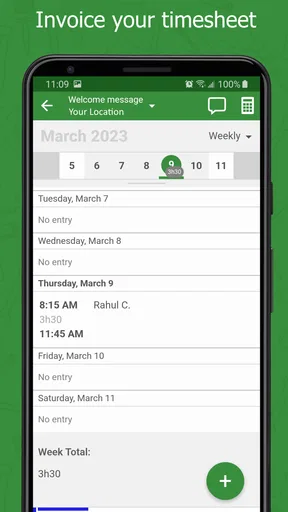
The app’s mix of scheduling, timesheets, estimates, and invoices suggests a useful routine for a small contracting team: check the day’s plan, record work as it happens, then prepare the paperwork while the job details are fresh. I would decide who owns each step before relying on that routine. For example, one person can handle estimates and invoices while another keeps the team’s time records current. The benefit is less backtracking; the trade-off is that shared work only stays tidy when everyone follows the same process.
For a household with one contractor and family members who occasionally borrow the phone, I’d keep work sessions distinct from personal use. Finish or save the business task before passing the device along, and avoid leaving a client document open where someone else might tap into it. The app can support coordination around work, but it should not be mistaken for a family organizer or a substitute for agreeing on who is allowed to handle business records.
Age and trust matter as much as convenience
The app is rated for Everyone, but that age label does not make contractor records suitable for casual use by every person who shares a device. I’d still use ordinary judgment about access, especially where client names, job details, or payment-related information are involved. A younger family member might be perfectly comfortable using the device for ordinary household tasks, while business entries remain the contractor’s responsibility.
There is also a difference between helping with a task and having authority to make a business decision. A trusted assistant may be able to enter job hours or prepare a draft estimate, but the contractor should review figures and terms before anything goes to a customer. That simple check is especially useful when the person entering information did not discuss the scope of the job directly.
Worth Reading Before You Choose

EA SPORTS FC Mobile 26 Is a Bigger Football Game, but It Takes Time

Flipboard Shows What News Apps Must Do Beyond the Feed

Switching to Android Auto Means Rethinking Your Driving Routine

Google Calendar Makes a Crowded Week Easier to Manage

Ludo King Makes the Most of the Minutes Between Plans

Baby Panda World Brings Quick Play to Modern Phones, but Its Game Library Feels Busy
Getting Started
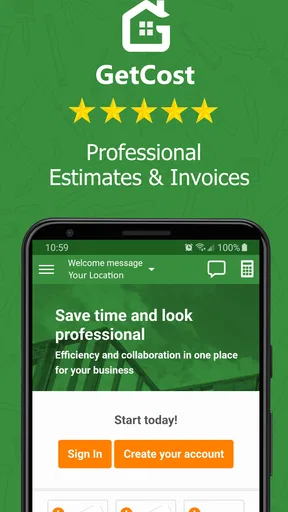
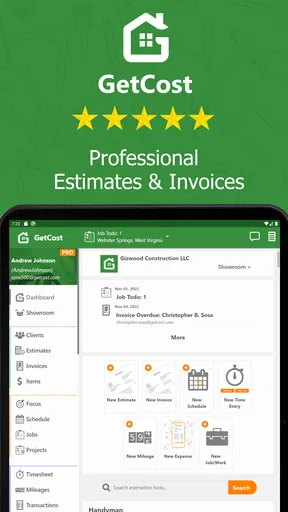
First off, downloading and setting up the Contractor Estimate & Invoice app is a breeze. Available on both Android and iOS, it’s just a quick install away from your app store. Once you've got it on your device, the onboarding process is straightforward with a clean interface that guides you through setting up your profile and business details. It’s like having a personal assistant that knows exactly what you need.
Features That Stand Out
One of my favorite things about this app is how comprehensive it is while still being user-friendly. Let’s dive into some of the key features:
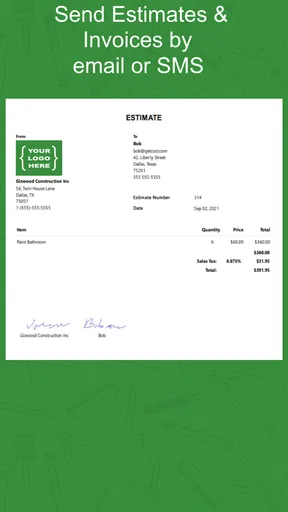
- Customizable Estimates and Invoices: You can create professional estimates and invoices with your company logo, which adds that extra touch of professionalism. It’s all customizable, so you can adjust it to match your brand.
- Expense Tracking: Keeping track of expenses can be a nightmare, but this app makes it simple. You can log expenses quickly, categorize them, and even attach receipts directly from your phone’s camera.
- Client Management: This feature is a game-changer. You can store client information, track interactions, and even see a history of estimates and invoices all in one place.
- Reports: Need to know how your business is doing? The app offers detailed reports that help you analyze your financial health and make informed decisions.
- Cloud Sync: All your data is synced across devices, so you can access everything whether you're in the office or on a job site.
Making the paperwork fit a real job
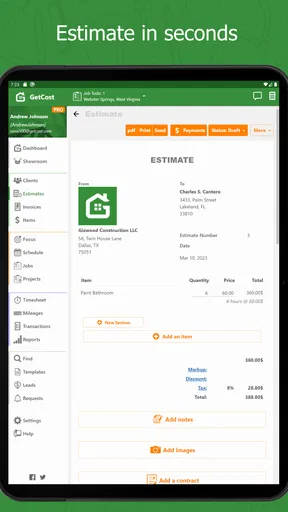
A useful way to get more from the app is to create an estimate soon after visiting a site, while measurements, materials, and the client’s requests are still clear in your mind. I’d use the estimate as a checkpoint before work begins: confirm the scope, review the figures, and make sure the customer understands what is included. When the job changes, keep the updated details consistent in the paperwork rather than relying on a memory or a text thread.
For example, imagine finishing a morning visit to assess a repair, then heading straight to another job. Instead of waiting until evening to reconstruct the first conversation, you can use a quiet moment to prepare the estimate and keep the client record with the relevant paperwork. Later, the invoice can follow the work that was actually completed. That workflow is most valuable when a contractor handles several small jobs, where the risk is less about one complicated project and more about forgetting a detail across many quick handoffs.
Receipts are easier to deal with when they are recorded close to the purchase, rather than collected in a van or pocket until the end of the week. I’d make expense entry part of the same end-of-job routine as checking hours: record the cost, categorize it consistently, and attach the receipt while it is at hand. This is a modest habit, but it makes later reports more useful because the records are less likely to depend on guesswork.
Using the App Day-to-Day
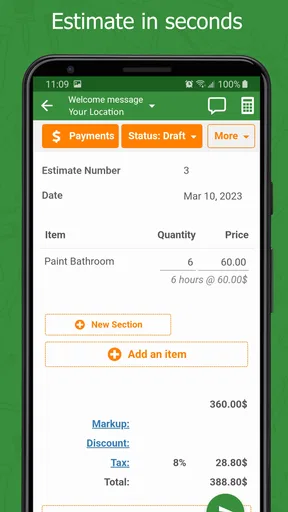
In my experience, the app really shines in its day-to-day usability. Whether I’m on-site or at my desk, I can whip out my phone, create an estimate, and send it to a client in minutes. The real-time sync ensures that I’m never out of the loop, even if I switch devices. And let’s not forget the notifications that remind you about pending payments and upcoming tasks. It’s like having a personal secretary who’s always on top of things.
For a small team, I would pair the scheduling and timesheet functions with a simple rule: update the plan when a job changes, and record hours before moving on to the next one. Otherwise, a schedule can quickly become stale and a timesheet can turn into an estimate made from memory. The app can bring those tasks into one work routine, but it cannot decide whether a late arrival, extra visit, or changed scope should alter the customer’s bill. That still needs a clear decision from the person running the job.
Compared with the usual mix of a spreadsheet, a calendar, and separate invoice documents, the main attraction here is having related contractor tasks in one place. That can reduce copying details between tools and make it easier to find the history for a customer. A spreadsheet may still be better for someone who wants to build custom calculations, while a dedicated accounting system may suit a business with more involved bookkeeping needs. I’d see this app as a practical operational hub, not automatically a replacement for every financial tool a contractor may use.
It is also worth deciding what a report is for before relying on it. A quick view of business activity can help identify unpaid invoices or recurring expenses, but a report is only as reliable as the entries behind it. If expenses are categorized differently from one week to the next, or job hours are entered late, the summary can look precise while still giving an incomplete picture. Consistent habits matter more than checking a report frequently.
Room for Improvement
Now, no app is perfect, and while Contractor Estimate & Invoice is pretty close, there are a few areas that could be better. The app sometimes feels a bit sluggish when pulling up detailed reports, especially if you have a lot of data. It’s not a deal-breaker, but it’s something to keep in mind if you’re managing a large volume of transactions.
Also, while the app offers a lot of customization, I found that some fields in the invoice templates could use more flexibility. For instance, adding custom terms and conditions requires a bit of a workaround.
That limitation is worth considering before you standardize all your paperwork around one template. If your contracts depend on detailed clauses, unusual billing stages, or highly specific line items, I’d prepare a sample document first and check that the result reflects how you actually quote work. If it does not, a more flexible document tool may be the safer choice for those jobs, even if you continue using this app for scheduling, client records, or routine invoices.
The app is a less obvious fit for a contractor who only sends an occasional invoice and already has a dependable process, or for someone whose business needs revolve around complex accounting rather than estimates and job coordination. It may also be more than a household member needs if they are simply trying to track shared chores or family expenses. Its value comes from contractor-specific work, so I would not install it expecting a general-purpose home finance tool.
Who will get the most from it
I’d recommend giving it a try if you work independently or with a small crew and regularly need to move from a site visit to an estimate, then from completed work to an invoice. It is especially appealing when business details are scattered across notes, messages, and separate files, because bringing client history and job administration together can make follow-up less fragile. The current version is 1.780, and it requires Android 5.0 or later on Android devices.
It has a 4.6 average from around 2.8 thousand ratings, with over 100 thousand installs. Those figures suggest that many people have tried it, but they cannot tell you whether its workflow matches your trade or how much customization your documents require. I’d judge it by setting up one representative client and running a complete example—from estimate through recorded expenses and invoice—before committing to it as the center of your process.
The app is free to install and is rated for Everyone; optional in-app purchases range from $9.99 to $599.99 per item. I would review the purchase options directly in the app before choosing a plan or involving a shared-device user. For a solo contractor, that helps separate the basic trial of the workflow from a longer-term spending decision. For a team, it gives the person responsible for the business account a chance to check the cost before others build habits around the tool.
The Final Verdict
All in all, the Contractor Estimate & Invoice app is a solid tool for anyone in the contracting business. It’s packed with features that make managing your business simpler and more efficient. Whether you’re a solo contractor or running a small team, it’s designed to make your life easier by handling the administrative side of things, so you can focus on what you do best—getting the job done.
If you’re looking for an app that combines ease of use, comprehensive features, and the ability to access everything from anywhere, then this app is definitely worth checking out. Give it a try and see how it can transform your business operations.
My household verdict is positive with one sensible boundary: I’d use it for contractor work on a shared device only when the account holder stays responsible for client records, document review, and purchases. For a small business that needs practical job administration more than bespoke accounting, it can bring a scattered routine into one place. If your paperwork depends on unusually flexible terms or your team needs a more specialized financial system, compare those needs first; the right choice is the one that keeps your records accurate without adding another chore.
Pros
- User-friendly interface for quick navigation.
- Customizable invoice templates available.
- Supports multiple currencies and languages.
- Real-time syncing across devices.
- Includes detailed reporting features.
Cons
- Limited free version features.
- Occasional syncing delays reported.
- No offline mode available.
- Subscription can be costly for small businesses.
- Customer support response time varies.
FAQs for Contractor Estimate & Invoice
What is the primary function of the Contractor Estimate & Invoice app?
The Contractor Estimate & Invoice app is designed to streamline the process of creating and managing estimates and invoices for contractors and small business owners. It enables users to quickly generate detailed estimates, convert them into invoices, and track payments, all from the convenience of their mobile device.
Is the Contractor Estimate & Invoice app compatible with both Android and iOS devices?
Yes, the Contractor Estimate & Invoice app is available for download on both Android and iOS platforms. This ensures that users can access the app and its features regardless of their device preference, making it a versatile tool for contractors on the go.
Does the app offer customization options for estimates and invoices?
Absolutely. The app allows users to customize their estimates and invoices with their company logo, contact information, and payment terms. This feature helps maintain a professional appearance and ensures documents align with the user's branding needs.
Are there any costs associated with using the Contractor Estimate & Invoice app?
While the app may offer a free version with basic features, advanced functionalities and additional customization options might require a subscription or in-app purchases. Users should review the pricing structure within the app store to understand any potential costs.
How does the app ensure the security of my financial data?
The Contractor Estimate & Invoice app employs robust security measures to protect user data. It typically includes encryption for data transmission and storage, ensuring that sensitive financial information remains secure. Users are encouraged to check the app's privacy policy for specific details.


